Disabling online-mode allows players without a premium Minecraft account to join. This reduces security and allows name spoofing unless you install proper protection plugins.
By default, Minecraft servers verify accounts with Mojang/Microsoft. This setting is called online-mode. To allow cracked (non-premium) clients, you must set:
online-mode=false
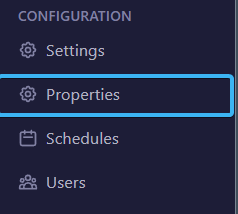
In your server panel, go to:
Configuration → Properties
Use the search bar and type online-mode. You will see a toggle with the current value set to true.

Changes only apply after a full server restart.
When running in offline mode, anyone can join with any username. To protect your server:
Disabling online-mode does not improve performance. It only disables Mojang authentication checks.
After restart, cracked clients can connect normally using:
IP:PORT